
Multi Account Management That Scales Without Chaos
Master multi account management for Meta, TikTok and Google Ads. Learn structures, access controls and workflows to scale operations without chaos.
- multi account management
- ad operations
- Meta Ads
- Google Ads
- agency workflow
Monday starts with three tabs becoming thirty.
A client wants budgets shifted before noon. Another brand has duplicate campaigns live in two regions. Someone on the team can’t access a Meta account they were in last week. Google Ads shows one trend, TikTok shows another, and your Slack is full of messages that all sound urgent. You’re not doing “reporting” at that point. You’re running a moving system of money, permissions, approvals, and changes across a lot of fragile surfaces.
That’s why multi account work feels heavier than it looks from the outside. The hard part usually isn’t reading performance. It’s knowing which account is the right one, who can touch it, what should happen next, and whether you can prove what changed after the fact. Once you’re handling dozens of accounts, small inconsistencies stop being annoying and start becoming risk.
Most new team leads try to solve this with more dashboards, more checklists, or more status meetings. That helps for a week. Then scale wins. The problem isn’t a lack of effort. The problem is that multi account management only stays calm when you treat it like operations infrastructure.
Table of Contents
- Introduction Why Multi Account Work Feels Chaotic
- What Multi Account Management Really Means
- Why Scale Pressure Is Growing for Every Team
- Core Building Blocks for Managing Many Accounts
- How Teams Standardize Workflows Across Meta TikTok and Google Ads
- Putting It Into Practice With Playbooks Plans and Audit Trails
- Conclusion Building a Calm and Accountable Operation
Introduction Why Multi Account Work Feels Chaotic
By the time a team is responsible for fifty or more accounts, the day usually splits into two jobs. The visible job is campaign performance. The hidden job is keeping the machine from slipping. That means linking the right accounts, routing requests correctly, checking access, avoiding spend mistakes, and keeping a record of every meaningful action.
A new lead often inherits this in rough shape. Account names don’t match across platforms. One person has broad admin access because it was “faster.” Another person has none because nobody knows who approves it. A client asks for the same change in Meta, TikTok, and Google Ads, but each platform has a different structure and a different path to get there. The team slows down before anyone even touches optimization.
The chaos usually starts before optimization
What breaks first at scale isn’t analysis. It’s basic control.
- Account inventory drifts: Teams lose a clean list of active, paused, restricted, and archived accounts.
- Access grows messy: Permissions pile up faster than they get reviewed.
- Requests arrive unstructured: “Can you increase spend?” means very different things without guardrails.
- Changes become hard to trace: Multiple people touch campaigns, but nobody can reconstruct the sequence later.
That’s the point where smart people start feeling disorganized even when they’re working hard.
Multi account work gets calmer when you stop asking, “How do we monitor all this?” and start asking, “How do we control it safely?”
The teams that hold up under pressure usually have three things in place. They know exactly what accounts exist and who owns them. They give people only the access they need. And they standardize how changes get requested, executed, and logged.
That sounds less exciting than bidding strategy. It’s also what prevents budget and permission errors before they happen.
What Multi Account Management Really Means
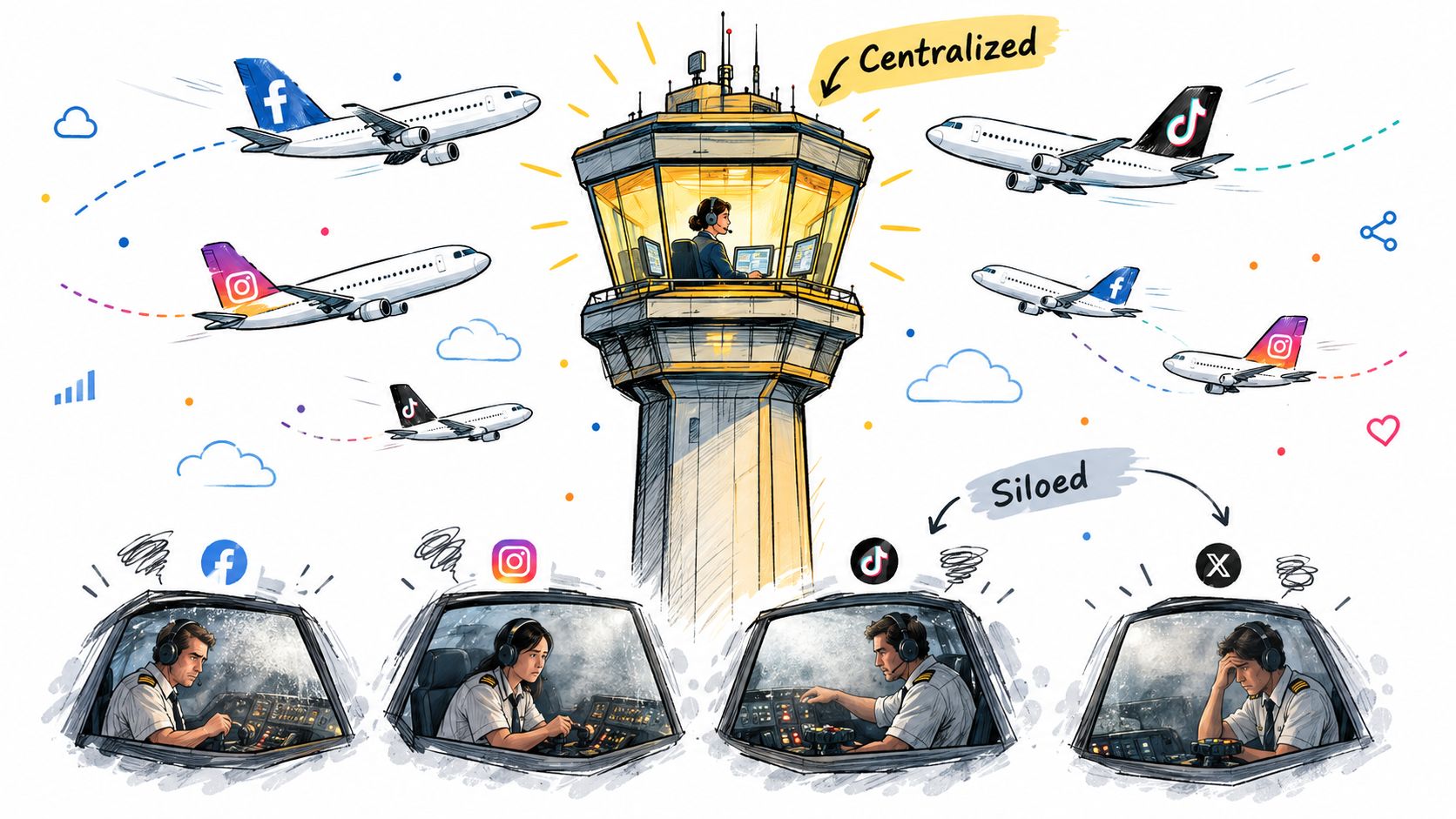
Think of single-account work like flying one plane. You can focus on one cockpit, one route, one dashboard. Multi account management is closer to an air traffic control tower. You’re not just watching flights. You’re coordinating many moving objects, making sure each one is identified, cleared, and handled safely.
That’s why the term gets misunderstood. People hear “multi account management” and picture a reporting layer that rolls up spend and conversions. Reporting matters, but it’s only one slice of the job. The work is centralized oversight across many accounts, with clear ways to see what exists, act on it safely, and verify what happened.
Google Ads made this shift explicit with its manager account model. Google’s own guidance describes a manager account as a central place to manage multiple Google Ads accounts, including other manager accounts, and says users can link up to 20 accounts per email address while comparing performance, tracking conversions across accounts, and generating automated reports, as summarized in this manager account overview. If you want another practical primer on the concept, this multi account management guide gives a useful broad view.
The three jobs every system must do
A workable setup has to do three jobs well.
-
See everything
You need one dependable inventory of accounts, brands, regions, owners, and platform status. If you can’t answer “Which account is this?” in seconds, your team will hesitate or act in the wrong place.
-
Act safely
It’s not enough to have access. The system has to make safe action easier than risky action. That includes role separation, approval paths, and platform-specific guardrails.
-
Prove what happened
When budgets change, ads pause, or permissions get updated, someone should be able to trace who requested it, who executed it, and what the outcome was.
Why people get confused
The confusion comes from mixing levels of work.
A dashboard answers, “How are accounts performing?” An operating system answers, “What can each person do, in which account, under what rules, with what record?” Teams often buy the first while needing the second.
Practical rule: If your process depends on people remembering account-specific quirks from memory, you don’t have a multi account system yet. You have experienced people patching over missing structure.
That distinction matters because scale doesn’t just create more rows in a report. It creates more chances to act in the wrong place, with the wrong permission, under the wrong assumptions.
Why Scale Pressure Is Growing for Every Team
The load on ad ops teams has changed. What used to feel like “a few accounts across a couple of platforms” now looks more like a portfolio operation with constant switching between systems, clients, and request types.
One benchmark captures that shift clearly. A 2025 Agency AdOps Benchmark Report cited by PPC Land found that agencies want account managers to handle 64 clients, up from a current average of 35, which is an 83% increase in portfolio size. The same report said 64% of ad strategists now manage campaigns across multiple channels, 80% manage three or more platforms at once, and 43% manage four or more. It also reported that teams spend an average of 46 hours per month making campaign changes for individual clients, which is more than 25% of their time, as summarized in this benchmark write-up.
Those numbers matter because they describe the daily shape of the work. More accounts means more ownership paths, more approval edge cases, more naming inconsistencies, and more chances to place a change in the wrong environment. More channels means the team carries three or four mental models at once.
Fragmentation is the hidden tax
Teams don’t feel overwhelmed because a single platform is impossible. They feel overwhelmed because every platform interrupts the others.
A 2026 agency benchmark found the share of strategists managing four or more ad platforms in daily work rose from 43% to 68%, a 58% increase in one year, according to Fluency’s 2026 Agency AdOps Benchmark Report. In practice, that means more context switching, more duplicated checks, and more time spent confirming basic facts before anyone makes a change.
Here’s what that tax looks like in the world:
- Different account hierarchies: One platform organizes ownership one way, another uses a different model.
- Different naming habits: Teams inherit account names that made sense once and now confuse everyone.
- Different approval norms: Finance, strategy, and execution don’t always move through the same path.
- Different action surfaces: Reading data might happen in one tool while changes happen somewhere else.
Workload multiplies risk, not just effort
This is the piece newer leads often underestimate. Adding accounts doesn’t add more work units. It multiplies the number of interactions between people, platforms, permissions, and exceptions.
That’s why “we’ll just be careful” stops working. Carefulness is not a system. At higher volume, people need standard intake, clear routing, and explicit ownership before they need another performance deck.
When teams scale without standardization, they don’t just get slower. They get less certain.
That’s also why the old split between “ops” and “analysis” gets blurry. If the team spends large blocks of time making manual changes and checking account context, operational design becomes part of campaign performance. A missed permission review or a messy account inventory can cause as much damage as a weak audience strategy.
Core Building Blocks for Managing Many Accounts
Once the volume is high, calm comes from architecture. I’d break the operating system into three connected blocks: inventory, access, and standardization. If one is weak, the others won’t hold.
Start with account inventory
Your account inventory is the master map. It should tell any team member what exists, who owns it, which platform it belongs to, what market or brand it serves, and whether it’s active, paused, restricted, or retired.
Google’s manager model matters here because it established the habit of handling multiple accounts through a central hub rather than separate logins, as noted earlier. But a manager hub by itself isn’t enough. You still need a team-owned inventory layer that reflects business reality, not just platform structure.
A practical inventory usually includes:
- Business identity: Brand, client, region, and internal owner
- Platform identity: Meta, TikTok, or Google Ads account reference
- Operational state: Active, onboarding, paused, restricted, or archived
- Funding and escalation path: Who approves spend or access changes
Operating principle: If a new teammate can’t tell whether an account is safe to touch within a quick scan, your inventory is incomplete.
Checklist for inventory
- Create one source of truth: Keep a maintained account list outside individual memory.
- Add ownership fields: Every account needs a named operational owner.
- Track status clearly: Separate active accounts from historical ones so teams don’t act on stale inventory.
Then tighten access and permissions
Bad access design creates quiet risk. Too little access slows the team. Too much access makes every mistake larger.
Practitioner guidance for Meta recommends limiting portfolio admins to two or three people because any admin can remove the others, while TikTok-style systems commonly separate roles such as Admin, Operator, Analyst, plus finance-only permissions. The same guidance recommends access reviews every 90 days to remove stale users and revalidate least-privilege assignments, as outlined in this secure ad account access audit guide.
That gives you a simple rule. Broad admin rights should be rare, role-based access should be normal, and reviews should be scheduled rather than optional.
| Platform | Recommended Roles | Admin Limit | Review Cadence |
|---|---|---|---|
| Meta | Admin, Operator, Analyst, finance-only where needed | Two or three people | Every 90 days |
| TikTok | Admin, Operator, Analyst, finance-only where needed | Keep broad admin access tightly limited | Every 90 days |
| Google Ads | Separate high-access users from reporting or support users | Keep broad admin access tightly limited | Every 90 days |
Checklist for access
- Cut standing privilege: Give the smallest access level that still lets the person do the job.
- Separate finance from execution: Budget and billing visibility shouldn’t automatically mean campaign control.
- Review on a calendar: Quarterly reviews work better than “we’ll clean this up later.”
If you want a practical reference point for evaluating tools that support this kind of structure, this round-up of ad account management tools is a useful starting point. For teams that want a simple workflow app to organize repeated operating tasks, you can also get started with LunaBloom AI as one option for standard process support.
Standardize the way work gets done
Many teams stall. They know access is messy. They know account names drift. But they still let every strategist invent their own process for launches, budget moves, and pausing logic.
Standardization doesn’t mean turning the team into robots. It means deciding in advance what should be consistent so people can focus on judgment.
Good standardization usually covers:
- Naming rules: Campaign, ad set, geography, audience, and date conventions
- Request intake: A structured format for budget changes, launch asks, and access requests
- Safety constraints: New creations paused by default, no hard deletes, and explicit review before sensitive actions
- Brand guardrails: Clear rules on offers, creative boundaries, and channel-specific limits
One design choice I strongly recommend is making destructive or expensive mistakes harder than reversible ones. If a system creates new campaign objects, they should start paused. If someone wants to remove something, archive is safer than delete. Those aren’t software quirks. They’re operating safeguards.
How Teams Standardize Workflows Across Meta TikTok and Google Ads
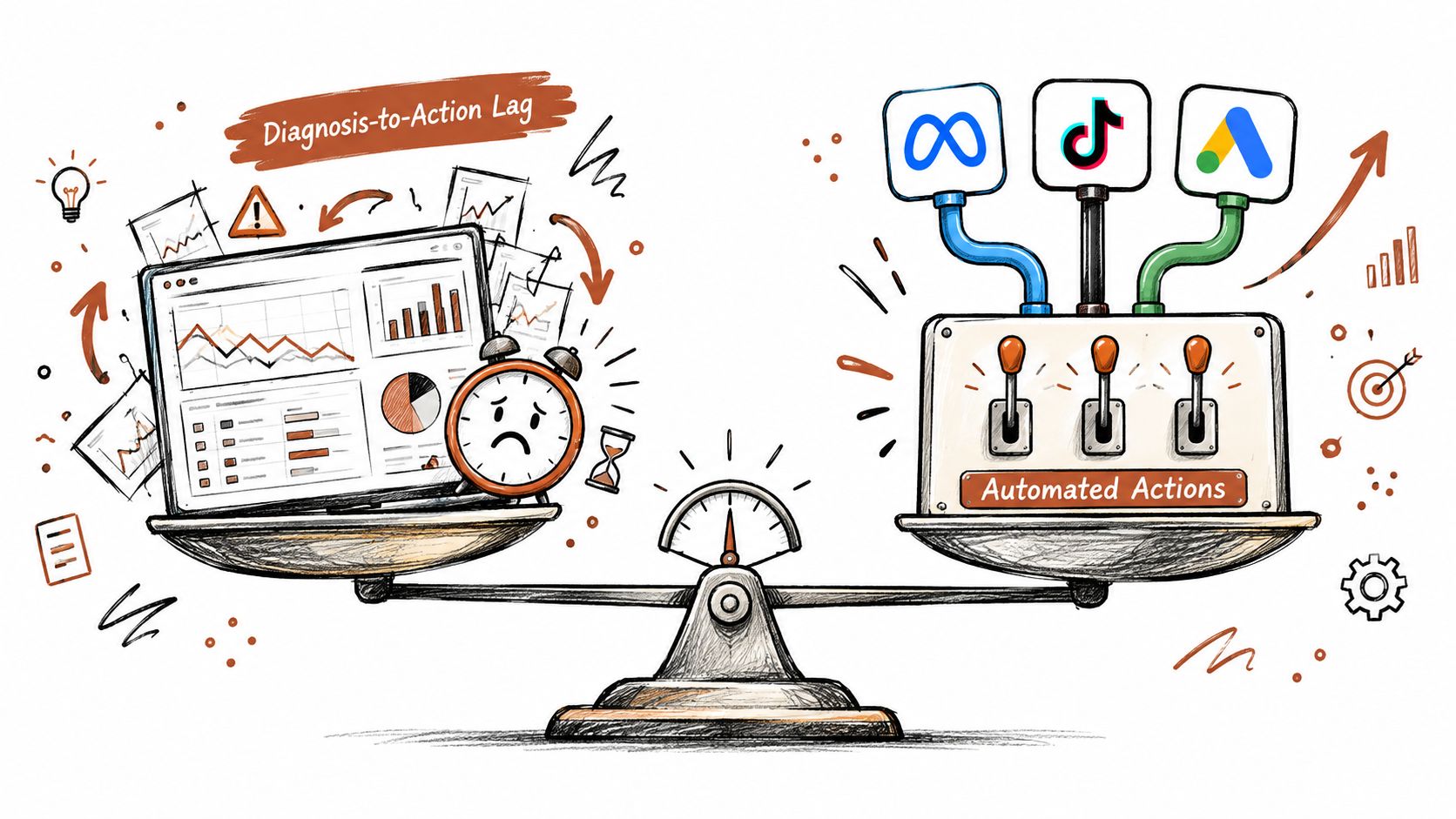
There are two common patterns teams use when the account count gets high. The first is a dashboard-first stack. The second is an execution-enabled operations stack. Both can work. They solve different problems.
Pattern one is dashboard first
In a dashboard-first setup, the team centralizes reporting but keeps execution inside each native platform. This is familiar and often easier to adopt because nobody has to change the action layer right away.
The tradeoff shows up in lag. A strategist spots an issue in one interface, opens another tool to investigate, then logs into Meta or Google Ads to act. Every handoff creates a small pause. Across many accounts, those pauses add up.
This model usually fits teams that:
- Need strong visibility first: Leadership wants rollups and cross-account comparisons.
- Have low change frequency: The team reads data often but acts less often.
- Prefer native execution: Specialists want every change made in platform.
Pattern two is execution enabled
In an execution-enabled setup, reading and acting happen through a more unified operations layer. OAuth connections matter here because they let teams connect Meta, TikTok, and Google Ads in a consistent way while keeping credentials handled server-side rather than exposed in prompts or copy-paste workflows.
That consistency matters more than people expect. When one system can read account structure and performance in a common shape, the team spends less energy translating between interfaces. Some teams use this model with tools such as AdCrunch, which connects Meta, TikTok, and Google Ads to agents in Claude, ChatGPT, and Cursor, supports read access across the three platforms, and allows write actions on Meta with an activity log for each change.
Teams considering this model should also study the human side of standardization. Many rollout failures happen because the process gets documented but not operationalized. This short piece on common process standardization pitfalls is helpful because it focuses on where adoption usually breaks.
A useful way to compare these two patterns is to look at decision speed, not just reporting quality.
| Workflow Pattern | Best Fit | Main Strength | Main Weakness |
|---|---|---|---|
| Dashboard-first | Teams with lower action volume | Strong visibility and familiar reporting | Slower path from diagnosis to action |
| Execution-enabled | Teams with frequent cross-account changes | Less tool-switching and tighter action loop | Requires clearer controls and workflow design |
How to choose without overthinking it
Use account count, team shape, and change frequency as your filters.
- Choose dashboard-first if your biggest pain is fragmented reporting and your specialists still prefer platform-native action.
- Choose execution-enabled if the team repeatedly diagnoses issues in one place and then wastes time reproducing the same checks before acting elsewhere.
- Watch your cost model: Per-account pricing can punish teams for instrumenting smaller clients or test accounts. Flat organization pricing is often easier to plan around when portfolios grow.
When you’re evaluating either route, don’t just compare dashboards. Compare operational friction. How many clicks does it take to answer a performance question, decide on an action, and complete that action safely? This overview of ad performance metrics can help anchor those conversations in the measures the team acts on.
A short walkthrough helps make the contrast more concrete.
Putting It Into Practice With Playbooks Plans and Audit Trails
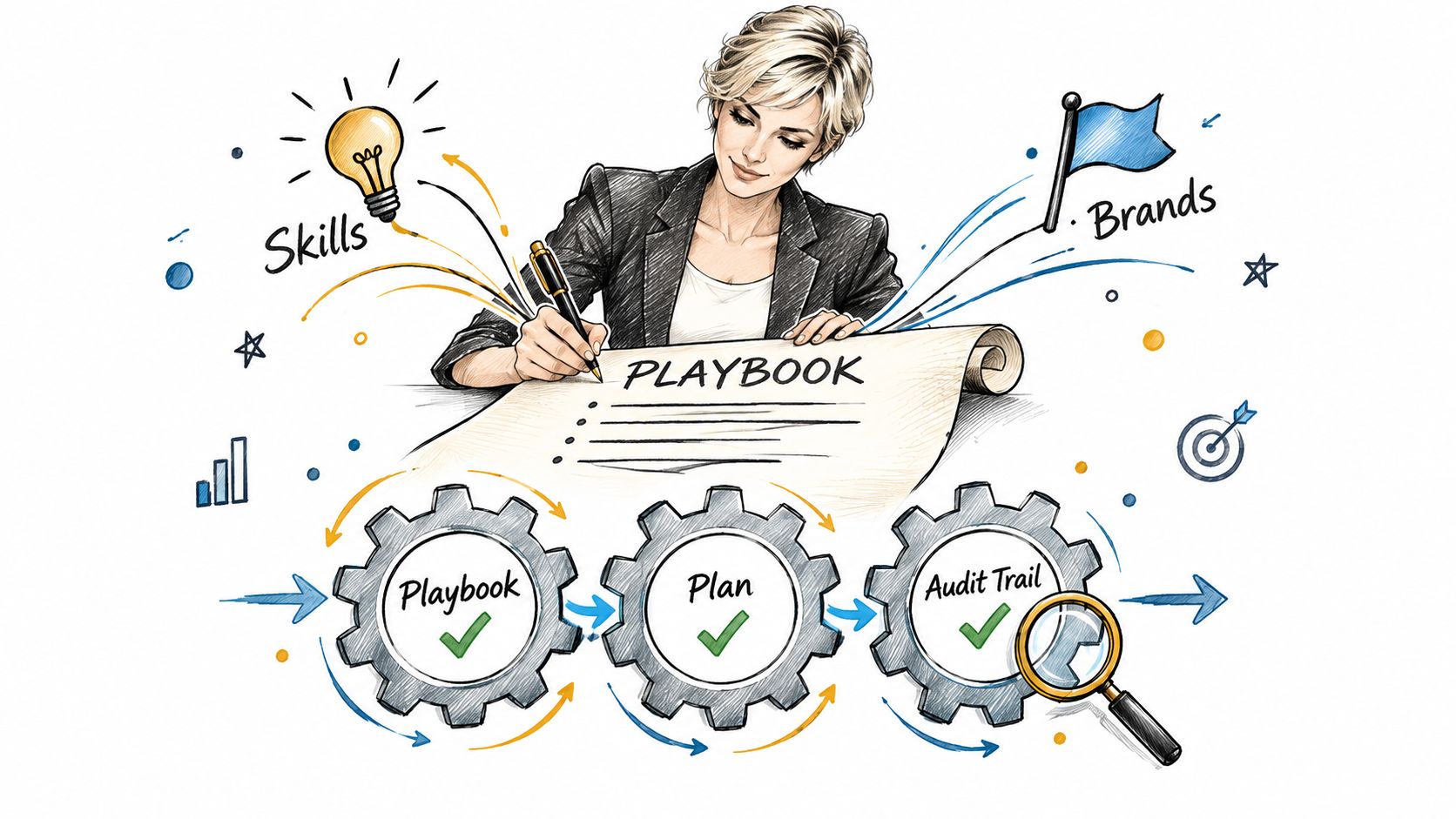
The cleanest multi account systems turn tribal knowledge into operating inputs. Instead of hoping each buyer remembers every brand rule and launch sequence, the team writes those rules down in a form that can guide execution.
Playbooks should drive action
A playbook is more than a checklist in a folder. In a workable system, it contains the repeatable logic behind launches, budget moves, naming, approval paths, and brand constraints.
That’s where structured tools help. Some teams encode guidance as reusable instructions and brand profiles so the same operating logic applies across accounts. Others keep the logic in project management tools and rely on human interpretation. The key is consistency. The team should not rewrite the operating method every time a campaign repeats.
A seasonal campaign launch is a good example. Say you’re launching one offer across fifteen accounts. You want the targeting pattern, naming, creative boundaries, and budget handling to stay aligned, while still allowing account-level differences where they belong. If the launch plan lives separately from execution, drift starts immediately.
Plans and launch records should stay synchronized
The stronger model keeps the plan and the action record tied together. Structured campaign plans with line items make that practical because each requested element has a clear operational meaning.
That matters for two reasons:
- The team knows what was intended: No ambiguity about what should have launched.
- The team knows what happened: Every change can be checked against the plan.
This is also where auditability stops being a compliance buzzword and becomes useful day to day. Independent marketing ops guidance frames auditability as traceable budget decisions, logged changes, and approval documentation, while cloud multi-account patterns point toward centralized logs and anomaly alerts for large account ecosystems, as discussed in this ops guide to auditability.
The question isn’t whether people made changes. The question is whether your team can reconstruct those changes without detective work.
For larger teams, execution surfaces matter too. Some systems let people work through chat-based agents in Claude, ChatGPT, or Cursor. Others expose a REST API or in-console agent so operations can happen inside existing workflows. The right choice depends less on trendiness and more on whether the interaction still preserves control, context, and traceability.
If you’re designing the process for a larger portfolio, this guide to a large account management process is a practical reference because it focuses on repeatability rather than one-off tactics.
Conclusion Building a Calm and Accountable Operation
Good multi account management isn’t measured by how many dashboards your team can open. It’s measured by how quickly the team can take the right action, in the right account, with the right permission, and show a clean record afterward.
That’s the shift that helps new leads settle down. You stop treating account sprawl as a reporting problem. You treat it as an operations system built on inventory, access, and standard execution. Once those are in place, performance work gets easier because people spend less time confirming basics and cleaning up preventable mistakes.
A simple self-check works well here.
- Inventory: Can anyone on the team identify the correct account and owner quickly?
- Access: Does each person have only the level of control they need?
- Auditability: Can you trace important changes without chasing screenshots or Slack threads?
- Workflow: Does the team launch and update campaigns through the same repeatable method?
If the answer is no on even one of those, that’s your next build priority.
Start with a small cluster of accounts. Standardize naming, tighten permissions, and force every change through one documented path. Once that holds, extend it. That’s how teams grow from reactive account handling into a calm, defensible operation.
AdCrunch gives multi-account teams one place to connect Meta, TikTok, and Google Ads, query performance, and take controlled action with a permanent activity log behind each change. If you want to reduce tool-switching while keeping launches, budget moves, and auditability in the same workflow, visit AdCrunch.